How to Photograph Your Flowers for Instagram
TJ Flowers NYCShare
Flowers are the most photographed gift in the world — and the most under-photographed well. Every day, our TJ Flowers NYC clients post their bouquets to Instagram with flat lighting, busy backgrounds, and sad overhead angles that flatten peonies into pink blobs. But flowers are Instagram gold when shot correctly: saturated, textured, luminous. The good news is your iPhone is already powerful enough to produce magazine-quality flower images. The bad news is most people never use more than 20% of what their camera can do.
This is our florist's guide to shooting flowers for Instagram — built from years of styling bouquets that end up in The Wall Street Journal, Vogue weddings, and the feeds of New York's most-followed home accounts. No DSLR required. Just your phone, natural light, and a few rules we'll walk you through.
Skip the guesswork — let our florists arrange it for you
Hand-arranged at our York Avenue studio · Same-day delivery across Manhattan by 7 PM
Shop best-selling bouquets →The one rule every flower photographer breaks: light first, angle second
Ninety percent of bad flower photos come from bad lighting — not bad composition, not bad styling. Flowers have textured petals, layered depth, and subtle color gradients that only directional natural light reveals. Overhead ceiling lights flatten all of that.
The golden rule: shoot within 6 feet of a window, between 10 AM and 3 PM, on a slightly cloudy day. Clouds act as a diffuser, softening harsh shadows while preserving contrast. Direct sun blows out pale petals; pure shade kills color.
In NYC apartments, the best windows are usually north-facing — they get constant, soft, even light all day. South-facing windows need a sheer white curtain or parchment paper taped over the glass to diffuse the harsh afternoon sun.
Five lighting setups that always work
1. Side light (the classic magazine look)
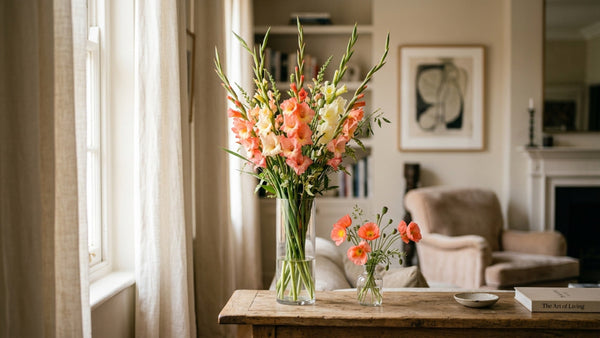
Place the bouquet 2–3 feet from a window, with the light coming from the side. This creates dimension — one side of each petal is bright, the other has a soft shadow. It's the setup we use for wedding bouquet portraits.
2. Backlight (dreamy and ethereal)
Position the bouquet between you and the window. The flowers glow, petals become translucent, and the background naturally darkens. Best for white, cream, and pale-pink blooms — the halo effect is stunning.
3. Overhead flat-lay (for styled shots)
Lay the bouquet on a white surface (marble cutting board, ceramic tile, large sheet of watercolor paper), and shoot straight down from above. Light should come from one side only. Add props — a pair of scissors, a linen napkin, an espresso cup — but keep the palette minimal.
4. Shadow play (moody and artistic)
On a sunny day, place a bouquet in direct window light and shoot the shadows it casts on a white wall. This is editorial, graphic, and works beautifully on IG as a mood image between bouquet close-ups.
5. Low angle (makes a small bouquet look grand)
Shoot from bouquet-height or slightly below, looking slightly up at the blooms. Instantly gives the arrangement presence — this is the go-to for photographing bud vases or single-stem orchids.
Composition rules that elevate everything
- The rule of thirds: Turn on your iPhone's grid (Settings > Camera > Grid). Place the focal bloom on one of the four intersection points, not dead center.
- Odd numbers: Three, five, or seven props in a flat-lay look more natural than two or four. Our brains read odd numbers as "curated" and even numbers as "staged."
- Negative space: Leave 40% of the frame empty. Crowded photos read as busy; spacious photos read as luxurious.
- Lead with color: Let the dominant flower color be 60% of the palette, the secondary 30%, accents 10%.
- Never tilt the camera: Keep your phone level. Tilted-camera flower shots look amateur.
iPhone camera settings that make the biggest difference
Most people shoot flowers on iPhone Auto and call it done. Here are the four changes that will transform your images:
- Tap to focus on the front-most petal, then drag the sun icon down to slightly underexpose. Underexposed petals retain saturation; blown-out highlights can't be fixed in editing.
- Turn off Live Photos — it softens the image. (Tap the bullseye icon in the top right.)
- Use Portrait Mode for close-ups with the focal bloom 6–12 inches from the lens. The background blur mimics professional DSLR bokeh.
- Shoot in ProRAW (iPhone 12 Pro and later) if you plan to edit seriously. You get 10x the color data of a JPEG, which matters hugely for subtle blooms.
Editing apps that actually matter
Skip the filter-heavy apps. The three that pros actually use:
- Lightroom Mobile (free): The gold standard. Learn three adjustments — Exposure, Highlights (pull down), and Vibrance (push up slightly). That's 80% of the workflow.
- VSCO: For consistent color palettes across a whole feed. We love the A-series filters for florals (A4, A6, A7 are all flower-friendly).
- Snapseed (free): Unbeatable "Selective" tool for brightening just a single bloom without affecting the background.
Avoid: oversaturating greens, shifting pinks toward orange (a common iPhone flaw), adding heavy vignettes. The goal is "slightly enhanced," not "artificially processed."
Color grading for different flower types
Each color family needs slightly different edits:
- White and cream flowers: Bring Highlights down, push Whites up, cool the White Balance slightly (-5). Prevents the dreaded "yellow tint."
- Pink flowers: Push Saturation up 10%, then tweak HSL > Pink Hue toward the cooler side (+5). Warms too easily on iPhones.
- Red flowers: Reduce Saturation (-5) and increase Vibrance (+10). Red over-saturates fast and loses detail.
- Yellow/orange flowers: Bump Shadows up slightly, keep Saturation modest. Yellows can look radioactive at +20 Saturation.
- Purple flowers: Shift HSL > Purple Hue slightly toward blue (-5). iPhones tend to push purples toward magenta.
Best times and days to post on Instagram (2026 data)
Post timing matters less than it used to — Instagram's algorithm is now primarily interest-based, not chronological — but there are still better and worse windows. Based on 2025–2026 engagement data across lifestyle and floral accounts:
- Weekdays: 11 AM–1 PM ET (lunch scroll) and 7–9 PM ET (evening wind-down) are strongest.
- Weekends: Saturday 10 AM–12 PM ET is the single best window for floral content. Sunday evenings underperform.
- Avoid: Mondays before 10 AM, Friday evenings after 6 PM, and Sunday nights.
- Reels vs. photos: A 5-second video of a bouquet rotating or water pouring into a vase gets 2–3x the reach of a still photo. Shoot both.
Caption and hashtag strategy
A beautiful photo with a throwaway caption underperforms a mediocre photo with a great caption. Rules we give our clients:
- Open with a 1-line hook — something specific about the bouquet, the occasion, or your mood.
- Keep hashtags in the first comment, not the caption. Use 8–15 hashtags mixing niche (#peonylove, #manhattanflorist) and broader (#flowerlovers).
- Tag your florist — @tjflowersnyc — so the bouquet can be reshared to a larger audience.
- Ask a question to drive comments ("What's your favorite bloom?" outperforms "These are beautiful.")
Location matters (for NYC accounts)
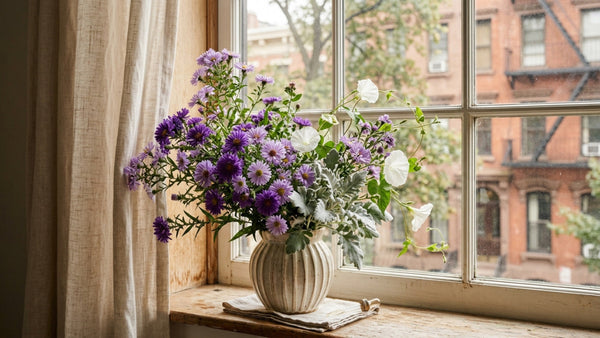
NYC apartment shots are their own genre. Your window view is a free set piece — use it. A Manhattan skyline or brownstone backdrop instantly anchors the shot as New York. For more care and styling guidance, see our vase pairing guide, or browse our current collection for photo-worthy blooms. And if your flowers need a bit of perking up before the shot, see our guide to reviving tired flowers.
Frequently asked questions
Do I need a ring light for flower photos?
No. Natural window light almost always beats a ring light for flowers. Save the ring light for video; use window light for stills.
What's the best time of day to shoot?
10 AM–3 PM on a slightly cloudy day near a window. Direct midday sun is too harsh; golden hour (the hour before sunset) can be beautiful but the warm tone shifts pinks orange.
Should I shoot on iPhone or buy a DSLR?
iPhone 14 Pro and newer produce results indistinguishable from entry-level DSLRs for Instagram. The money is better spent on a small tripod and good editing app subscriptions.
How do I make my flowers stand out against a busy NYC apartment background?
Use Portrait Mode to blur the background, or place a plain sheet of white matboard behind the bouquet as a temporary backdrop. Both solve the problem instantly.
What's the single best trick for better flower photos?
Move the bouquet. Most people set the vase down and photograph where it lives — on the kitchen island, next to the coffee machine. Pick it up, move it to the best-lit spot in your apartment, shoot, then put it back. 90% of the improvement comes from that one step.
Order a photo-ready bouquet
Every TJ Flowers NYC bouquet is designed with light, texture, and color dimension in mind — the kinds of details that photograph beautifully. Tag us @tjflowersnyc when you post. Same-day delivery across Manhattan and most of Brooklyn.
Order in NYC: Upper East Side florist · Same-day flower delivery Manhattan · Luxury florist NYC
NYC's trusted florist since 1988, specializing in orchids with 66+ varieties. Located at 1640 York Ave on the Upper East Side, we craft luxury arrangements for weddings, corporate events, and everyday moments. Same-day delivery across Manhattan, Brooklyn, and Queens.
Get Floral Inspiration
Fresh arrangement ideas, care tips, and exclusive offers delivered to your inbox.